Membership cancellations are an inevitable occurrence in business, and while regrettable, they do occur. At MyTime, merchants can configure a cancellation fee if a client opts to cancel their membership. In this article, we will guide you through the steps to configure a cancellation fee for memberships.
Things to Know:
- The ability to configure a membership cancellation fee is controlled by the " Memberships" access control setting.
- You can only charge a membership cancellation fee if the client has a card/bank account on file. Once you set up a cancellation fee on a membership, initiating a cancellation from the client's profile will trigger a pop-up asking if you want to charge the client the cancellation fee. If you agree, the system will automatically charge the fee to the client’s card on file.
- You can set up a cancellation fee in two places:
- Directly on the membership template, which applies the fee to all membership purchases
- On the client’s profile, which allows you to customize the fee for an individual client.
- When canceling a membership, the cancellation fee can only be waived in-store.
- Cancellation Fees online:
- Indefinite Memberships: If cancelled online and a cancellation fee applies, the fee is charged immediately, and the membership is cancelled immediately.
- Term Memberships: If cancelled online and a cancellation fee applies, the fee is charged immediately, but the membership enters "Pending Cancellation" status and stays active until the end of the contract term.
- If the client does not have a card on file or the cancellation fee payment fails, the membership will not be cancelled, and an “Error canceling membership” message will be displayed.
- The setup option displayed in the top-right user menu depends on how you access the account and your assigned role:
- When navigating from the Parent Account (Location Management tab):
- Admin: Displays Business Setup when viewing the location account.
- Login As: Displays Location Setup when viewing the location account.
- When logged in directly at the Location Level:
- Location Owners & Location Managers: Display Location Setup.
- Service Providers & All Other Roles: Display Profile Setup.
Contents
- Adding Membership Cancellation Fee from the Membership Interface
- Adding Membership Cancellation Fee from the Client Profile
Adding Membership Cancellation Fee from the Membership Interface
To configure a membership cancellation fee:
- Go to Business Setup / Location Setup > Memberships
- Choose the membership to which you want to apply the cancellation fee, then find the Cancellation Fee section in the membership general settings
- Specify the dollar amount you intend to charge clients when they cancel the membership
- Click "Publish Membership"


Adding Membership Cancellation Fee from the Client Profile
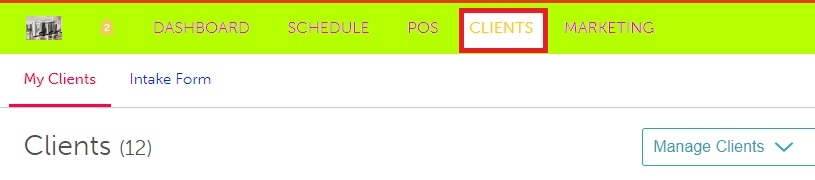
- Go to the Clients tab
- Locate and select the desired client's profile
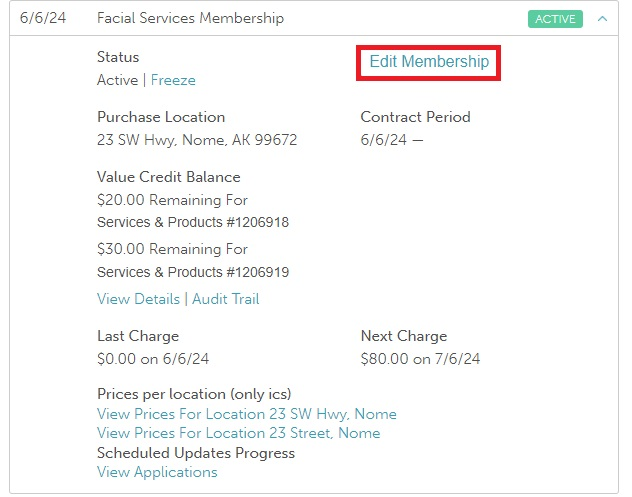
- Navigate to the Memberships section and click on the name of the membership you wish to add the cancellation fee

- Click "Edit Membership"
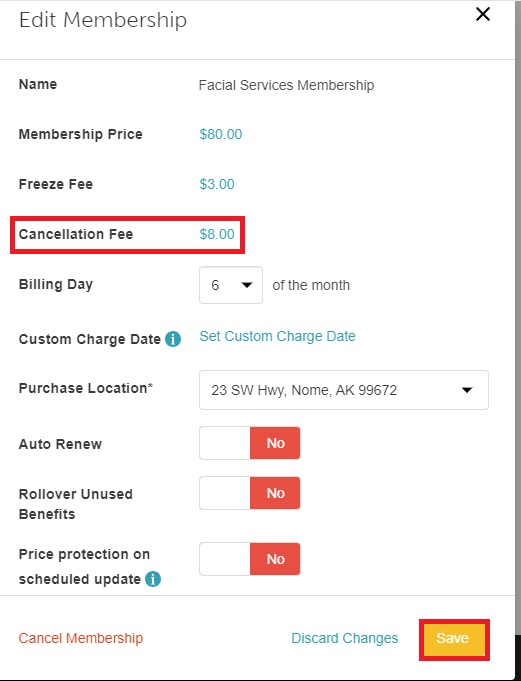
- On the Edit Membership modal, click on the hyperlink at the "Cancellation Fee" section and insert the dollar amount you want to charge for the cancellation.
- Click "Save"
If a client wishes to cancel a membership with a cancellation fee, they will be charged once a card is on file. To learn how to cancel a membership on a client's profile, click here.
For more information, contact us at support@mytime.com.
Related Articles
Editing Memberships on Client Profiles
Indefinite Membership Configuration
Updating Existing Client Memberships
Upgrading or Downgrading Memberships
Membership Cancellation Reasons
Freezing and Unfreezing Memberships
Commission on Membership Sales
Commission on Appointments and Products in Membership
Membership Value Credits vs Membership Item Credits
Selling Memberships for Clients in POS
Selling Memberships for Family Members in POS
Selling Memberships for Pets in POS
Selling Memberships Online through Booking Widget
Selling Products, Gift Cards, Memberships and Packages on Scheduler App
Reconciliation for Memberships
Membership Item Credits Report
Membership Value Credits Report
Was this article helpful?
That’s Great!
Thank you for your feedback
Sorry! We couldn't be helpful
Thank you for your feedback
Feedback sent
We appreciate your effort and will try to fix the article