You can reorder the memberships that are offered for purchase on the embedded booking widget and express checkout page. In this article, we will show you how to rearrange memberships.
Things to know:
- The ability to reorder memberships is governed by the 'Memberships' access control setting
- When a membership is reordered, the specified order will be reflected consistently in the membership dropdown on the client profile, booking widget, and POS products tab.
- For franchise businesses, global memberships can be reordered at the parent account level, while local memberships can only be reordered at the child account level
- Adding a new membership or editing existing ones after rearranging them does not affect the arranged order
- The setup option displayed in the top-right user menu depends on how you access the account and your assigned role:
- When navigating from the Parent Account (Location Management tab):
- Admin: Displays Business Setup when viewing the location account.
- Login As: Displays Location Setup when viewing the location account.
- When logged in directly at the Location Level:
- Location Owners & Location Managers: Display Location Setup.
- Service Providers & All Other Roles: Display Profile Setup.
To reorder memberships:
- Navigate to Business Setup > Memberships tab
- Add memberships or from your list of memberships, click and hold the 3 vertical lines to the left of the membership to move them in place
- Rearrange in the order of preference
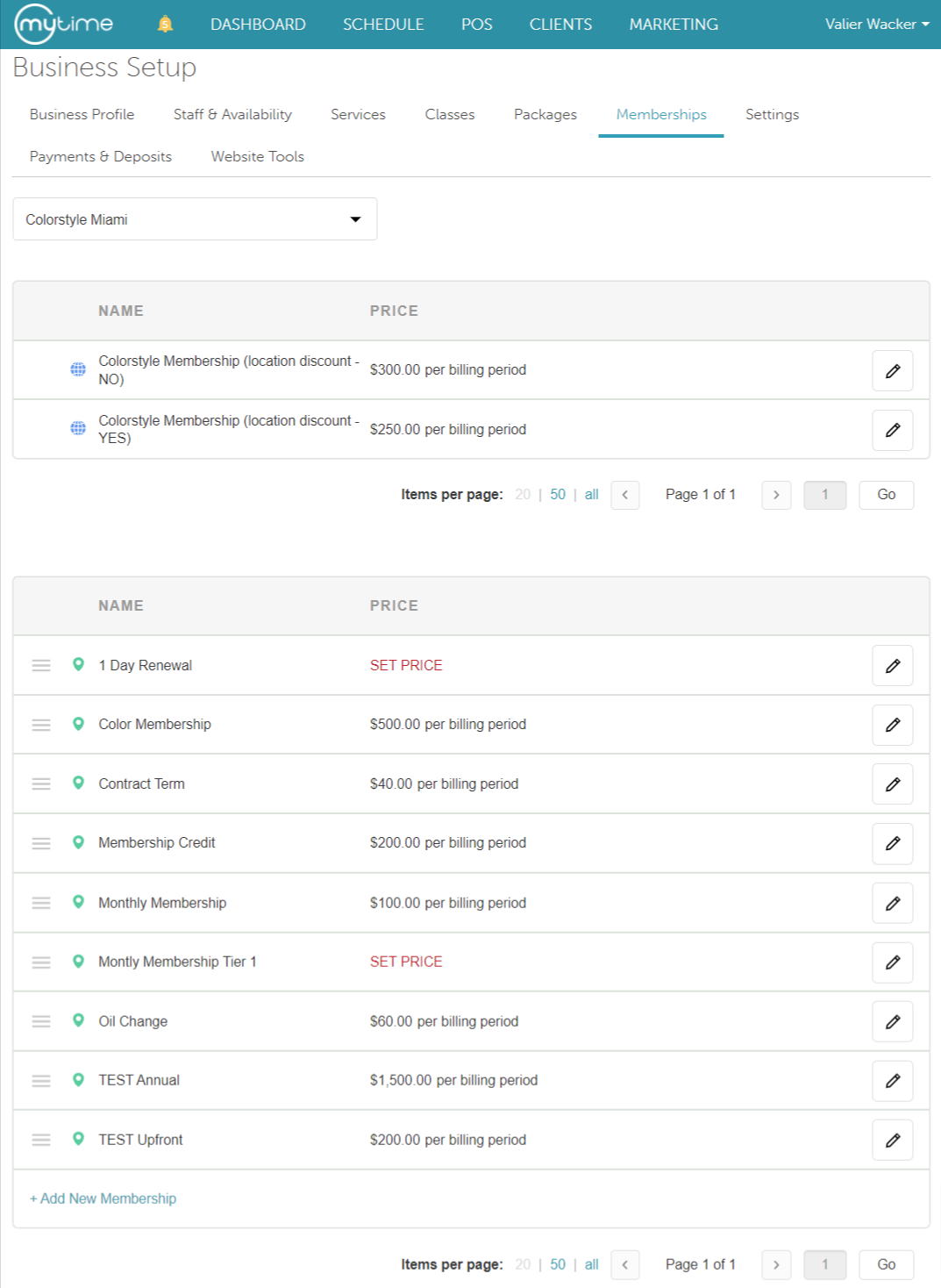

Once satisfied, you can view this order from the client's profile when adding a membership or in POS.
Client's Profile Membership Order

Booking Widget Membership Order

POS Membership Order

For more information contact us at support@mytime.com.
Related Articles
- Indefinite Membership Configuration
- Term Membership Configuration
- Updating Existing Client Memberships
- Upgrading or Downgrading Memberships
- Membership Cancellation Fee
- Membership Cancellation Reasons
- Membership Statuses
- Editing Memberships
- Deleting Memberships
- Refunding Memberships
- Reorder Memberships
- Freezing and Unfreezing Memberships
- Cancelling Memberships
- Classes in Membership
- Appointments in Membership
- Products in Membership
- Commission on Membership Sales
- Commission on Appointments and Products in Membership
- Membership Value Credits vs Membership Item Credits
- Membership Promotion Setup
- Selling Memberships for Clients in POS
- Selling Memberships for Family Members in POS
- Selling Memberships for Pets in POS
- Selling Memberships Online through Booking Widget
- Selling Products, Gift Cards, Memberships and Packages on Scheduler App
- Reconciliation for Memberships
- Membership Payments Report
- Membership Roster Report
- Membership Item Credits Report
- Membership Value Credits Report
Was this article helpful?
That’s Great!
Thank you for your feedback
Sorry! We couldn't be helpful
Thank you for your feedback
Feedback sent
We appreciate your effort and will try to fix the article