The Tip Request notification allows businesses to collect tips seamlessly via SMS. This automated message is sent directly to clients' mobile phones, prompting them to reply with a specific tip amount.
Things to know:
- The ability to view and customize the Tip Request automated message is governed by the "Accessing Automated Messages" access control setting.
- The Tip Request automated message will not be visible for accounts with the "Allow Clients to Leave Tips?" setting disabled
- If both the "Request tips via SMS for prepaid appointments" and "Request tips via SMS for non-prepaid appointments" settings are disabled, clients will not receive automated tip request SMS notifications.
- Tip requests are sent exclusively via SMS; there is no email fallback available for this feature
- The client must have a valid mobile phone number saved on their profile. For appointments that were not prepaid, the client must also have a credit card on file so the system can process the charge when they reply.
- Tip-related SMS messages are dispatched 5-10 minutes prior to the scheduled appointment, ensuring clients are informed beforehand about the opportunity to leave a tip via SMS following their appointment. This proactive method ensures clients are acquainted with the tipping process, improving convenience and delivering a smooth experience.
- Clients are granted a 3-hour window post-appointment to submit their tip via SMS
- Clients must reply to the tip request SMS with the exact tip amount they want to add. If they prefer to tip a percentage of the total, they must calculate the amount themselves and reply with that value. For example, if the service costs $50 and they want to tip 10%, they should reply with 5, as replying with 10 would result in a $10 tip.
- Tips submitted via SMS are factored into your SMS billing. This means that any text messages related to tipping will contribute to the overall SMS charges associated with your account. Learn more here
- SMS Segment Calculation & Billing
- SMS billing is calculated per segment, not per message.
- Each segment is billed individually
- Each recipient receives their own copy of the message
- Total cost = segments × recipients × rate. Example: 2-segment message sent to 50 recipients = 100 billable segments
- Learn more about SMS Segments & Billing here
- SMS Campaign Opt-Out Disclaimer: When configuring or sending an SMS campaign, an orange disclaimer note will appear directly below the text box as a reminder: "We automatically append "Reply STOP to Unsubscribe" to the message if the client has not received the disclaimer in the past 30 days. This counts against the message limit of 160 characters per SMS segment."
- Client Opt-Out Behavior: Clients can unsubscribe from SMS marketing messages at any time by replying with any of the following keywords:
`STOP`
`UNSUBSCRIBE`
`UNSTOP` (dependent on client's carrier)
Once a client unsubscribes, they will no longer receive SMS marketing messages from your business.
- If a client's card transaction fails when the tip is processed, the system automatically sends them an error text.
To customize your Tip Request template, follow these steps:
- Navigate to Marketing > Automated Messages
- Select Booking Notifications from the filter in the top-right corner of the page, then locate the "Tip Request" template

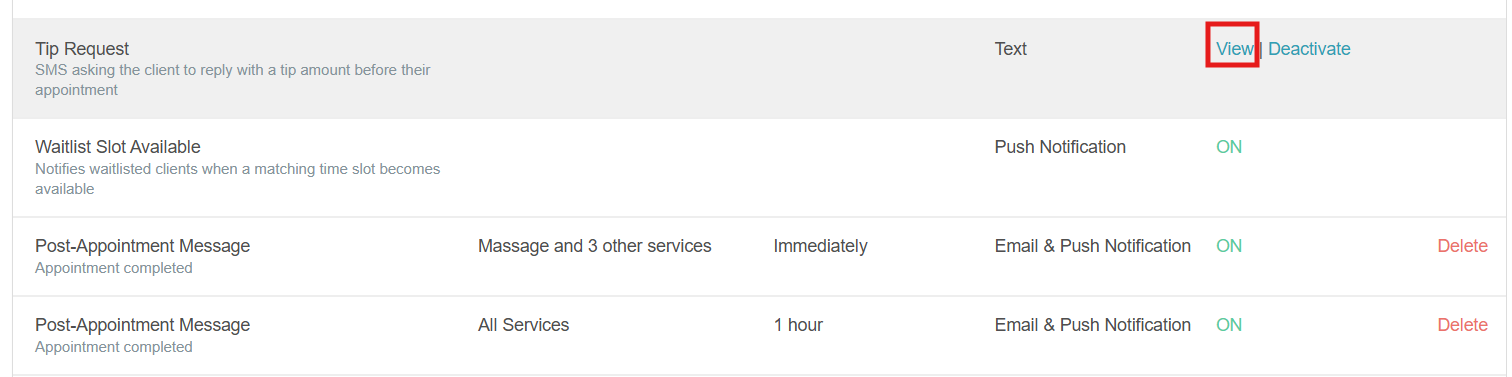
- Hover over the template and select View
- Select the + Service-specific Instructions hyperlink to add unique instructions for individual services. These instructions will be included in the SMS notifications sent to clients who book those specific services.
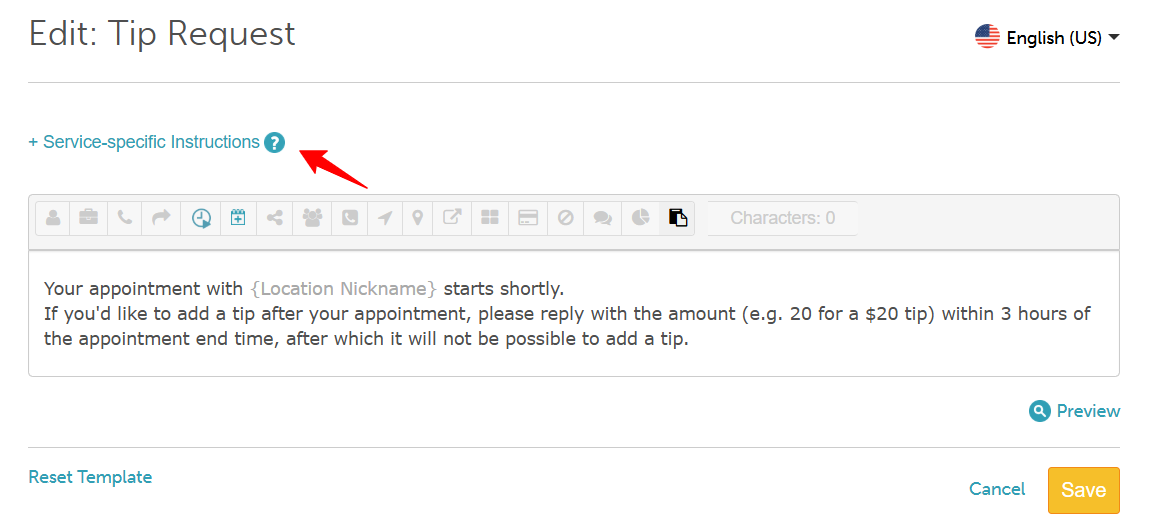
- Customize the notification text to suit your business needs
- Select Save
For more information, contact us at support@mytime.com or (385) 233-6964.
Related Articles:
Tipping via Credit Card Terminal with Card on File
Tipping via Credit Card Terminal (Key-In / Swipe / Tap Card)
Was this article helpful?
That’s Great!
Thank you for your feedback
Sorry! We couldn't be helpful
Thank you for your feedback
Feedback sent
We appreciate your effort and will try to fix the article