An environmental fee is a charge, either a flat dollar amount or a percentage of the service subtotal used to cover the cost of disposable materials (such as foils, bottles, and eco-friendly waste disposal). This fee can be configured on a per-service basis.
Things to know:
- The ability to create environmental fees is governed by the "Accessing Services Menu" access control setting.
- For franchise businesses, Environmental Fees can be created at either the parent or child level, and applied to both local and global services.
- For mobile businesses, you can configure an environmental fee for services offered both at the client’s location and in-store.
- Environmental fees can vary by location
- Environmental fees can be set as taxable and refundable
- Environmental fees can be set as a flat rate (e.g., $5.00) or a percentage of the service subtotal (e.g., 5%).
- When set as a percentage, the fee is calculated using the service's gross (original) price. Discounts, package credits, and membership credits do not reduce the service total used for this calculation.
- If a ticket includes multiple eligible services, the fee is calculated individually for each qualifying service based on its gross list price.
- Calculation Example:
- Couples Massage ($350) × 5% = $17.50 fee
- Gel Manicure ($150) × 5% = $7.50 fee
- Total Environmental Fee: $25.00
- Environmental fees are automatically applied to tickets containing qualifying services, both on the POS and for online bookings.
- Only one environmental fee can be applied per appointment. If an appointment includes multiple services with applicable environmental fees, the highest fee will be automatically selected.
- Environmental fees can be removed (but not edited) from a ticket. Once removed, they will not be automatically reapplied, even if additional services are added to the appointment. To reapply the fee, the appointment must be removed from the ticket and then added back.
- If an environmental fee is configured with a custom name, the system will display it differently depending on where it is being viewed from:
- In-Store (POS): On printed tickets and the Point of Sale screen, the fee will reflect your custom name.
- Online: On the online booking widget, the fee will always be displayed as the standard "Environmental Fee."
- The setup option displayed in the top-right user menu depends on how you access the account and your assigned role:
- When navigating from the Parent Account (Location Management tab):
- Admin: Displays Business Setup when viewing the location account.
- Login As: Displays Location Setup when viewing the location account.
- When logged in directly at the Location Level:
- Location Owners & Location Managers: Display Location Setup.
- Service Providers & All Other Roles: Display Profile Setup.
To set up an environmental fee for your business:
1. Navigate to Business Setup / Location Setup > Services
2. At the bottom of your page, select the Set Environmental Fees button

3. Select the + Add Environmental Fee link

4. Fill in all the following details:
- Fee Name: The name that will appear for the environmental fee
- Type: Select Flat to charge a fixed dollar amount, or Percentage to charge a percentage of the qualifying service subtotal. (Default: Flat)
- Amount: Enter the charge value a dollar amount for Flat (e.g., $5.00) or a percentage rate for Percentage (e.g., 5%).
- Applicable Locations: Choose the location(s) where the environmental fee will be charged after selecting the applicable services
- Applies To: Select the service category and the specific service(s) to which the environmental fee will apply.
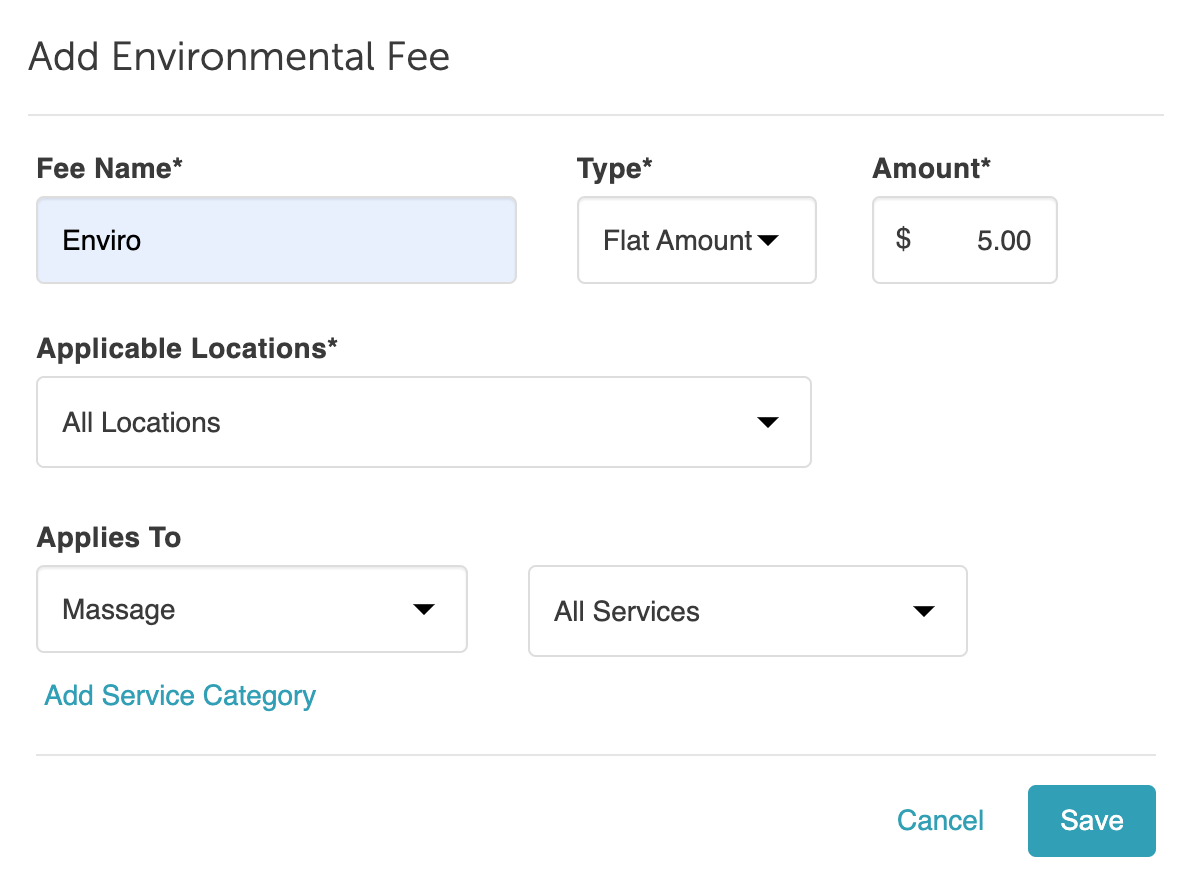
5. Once you have created your fee, select Save

Environmental fees will then be added to the client’s ticket at checkout in POS and the booking widget.
POS

Booking Widget

FAQs
1. Are environmental fees taxable?
Yes, environmental fees are taxable if tax is explicitly configured to apply to the fee in your account settings.
2. Are environmental fees added to memberships, packages, and gift cards?
No. Environmental fees apply strictly to selected eligible services.
3. How do environmental fees work with discounts?
Discounts apply only to the base service price. Environmental fees are never reduced by promo codes or percentage discounts, and they do not affect pre- or post-commission calculations.
4. Do environmental fees affect staff member commission?
No, environmental fees are excluded from commission calculations and do not impact staff earnings.
5. Are environmental fees shown during online booking?
Yes. The fee is clearly displayed to clients on both the "Pick a Time" page and the final checkout screen.
6. What if a deposit or prepayment is required?
If a service requires an online deposit, the client is charged both the deposit and the environmental fee at the time of booking. In-store staff can manually remove the fee from the ticket during final checkout if needed.
7. Can I waive or remove an environmental fee during checkout?
- In-Store (POS): Staff members can manually remove (but not edit) an environmental fee from a ticket. Once removed, the fee will not automatically re-add itself—even if new services are added. To reapply a removed fee, you must remove the appointment from the ticket and re-add it.
- Online: Clients cannot remove or waive environmental fees during online booking.
8. Are there reports available for environmental fees?
Yes. You can view total collected fees and detailed transaction breakdowns in the Environmental Fees Report.
Related Articles:
Was this article helpful?
That’s Great!
Thank you for your feedback
Sorry! We couldn't be helpful
Thank you for your feedback
Feedback sent
We appreciate your effort and will try to fix the article