This article explains how to enable the Automatic Staff Clock-Out feature and describes the scenarios in which it applies.
Things to know:
- The ability for staff to clock in and out is controlled by:
- The “Do staff members need to clock in/out?” company setting
- The Clock In/Clock Out access control setting
- When the "Automatically clock out staff members?" setting is enabled, if a staff member forgets to clock out at the end of their shift, the system will automatically clock them out at midnight.
- The automatic clock-out time is based on the end of their scheduled shift, which is determined in the following order:
- Custom hours, if configured
- Profile hours, if no custom hours are set
- Location business hours, if neither custom nor profile hours are defined
- The setup option displayed in the top-right user menu depends on how you access the account and your assigned role:
- When navigating from the Parent Account (Location Management tab):
- Admin: Displays Business Setup when viewing the location account.
- Login As: Displays Location Setup when viewing the location account.
- When logged in directly at the Location Level:
- Location Owners & Location Managers: Display Location Setup.
- Service Providers & All Other Roles: Display Profile Setup.
Contents
Enable Automatic Clock Out of Staff Members
To enable this feature:
- Navigate to Business Setup / Location Setup > Settings
- Scroll to the Staff section
- Toggle "Automatically clock out staff members?" to YES
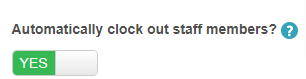
- Click Save
Scenarios
The system determines the automatic clock-out time based on the staff member’s setup and the following scenarios:
- Profile Hours Only: If a staff member has hours set on their profile but no custom hours, the system uses the profile end time to clock them out at midnight.
- Custom Hours Only: If a staff member has custom hours set and no profile hours, the system uses the custom end time for the automatic clock-out.
- Both Profile and Custom Hours: When both are set, the system prioritizes the custom hours’ end time for clocking out at midnight.
- No Hours Set (Profile or Custom): If no working hours are configured, the system defaults to the location’s business hours and uses the business closing time for the automatic clock-out.
- Clock-In Time Differs From Schedule: If a staff member clocks in earlier or later than their scheduled shift but forgets to clock out, the system still uses the scheduled end time from their profile or custom hours to determine the automatic clock-out.
- Multiple Locations: If a staff member clocks in at multiple locations but fails to clock out, the system clocks them out at midnight using the profile end time for each respective location.
If you have any questions, please contact our Support Team at support@mytime.com.
Related Articles
Was this article helpful?
That’s Great!
Thank you for your feedback
Sorry! We couldn't be helpful
Thank you for your feedback
Feedback sent
We appreciate your effort and will try to fix the article