MyTime allows you to control which pet intake forms appear in the “Select an Intake Form” dropdown when generating an intake form from a pet profile. This helps prevent staff from selecting the wrong form and protects sensitive information from being shared unintentionally.
Things to know:
- You can configure your account to restrict staff access to intake forms using the following settings.
- Configuration Options
- Hide Generate Intake Forms
- Removes the "Generate Intake Form" button entirely. This prevents staff from manually sending forms from client profiles, pet/family member profiles, or appointment modals.
- Hide Mandatory Intake Forms
- The "Generate Intake Form" button remains visible, but system-generated forms (such as "Mandatory Fields" and "My Account") are filtered out and hidden from the dropdown menu.
- Enable Hide Mandatory Forms for Child
- Applies specifically to pet or family member profiles. This hides any form where the "Show in Generate Intake Form" option has been unchecked.
- To enable these features for your account, please contact the MyTime Support team at support@mytime.com.
- To learn how to generate a pet intake form, click here.
- Hiding unused or sensitive pet intake forms helps reduce mistakes and safeguard private notes or data.
Once the hidden setting has been enabled:
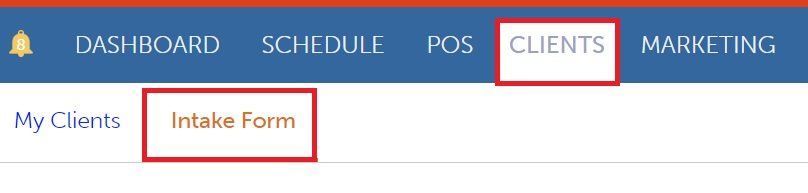
- Navigate to the Clients tab.
- Click the Intake Form hyperlink.
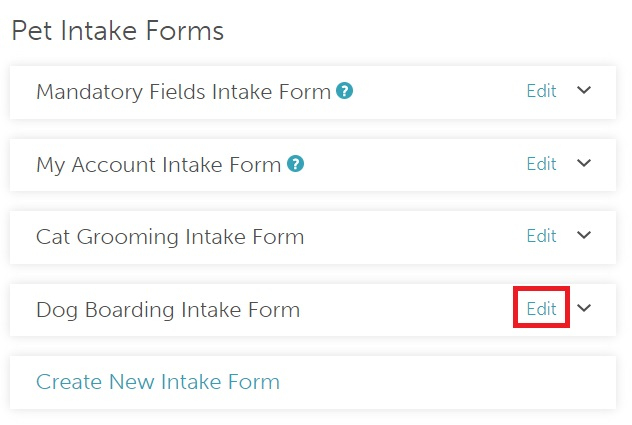
- Scroll down to the Pet Intake Forms section.
- Locate the intake form you want to hide and click Edit.
- Uncheck the box labeled "Show in Generate Intake Form."
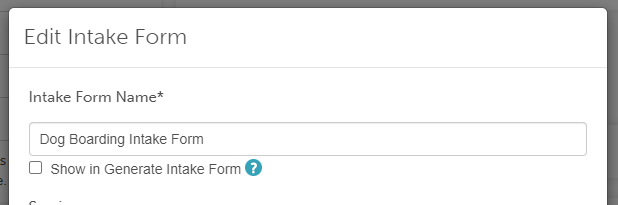
- Click Save.
Once saved, the form will no longer appear in the “Generate Intake Form” dropdown on the pet profile.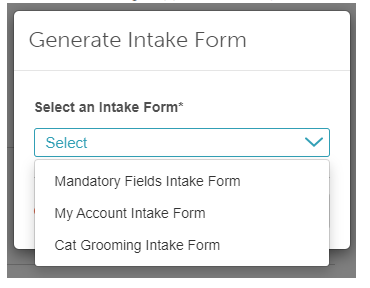
For more information contact us at support@mytime.com.
Related Articles:
- Creating Pet Intake Forms
- Generating Pet Intake Forms
- Pet Intake Forms On Booking Widget & Express Checkout Page
Was this article helpful?
That’s Great!
Thank you for your feedback
Sorry! We couldn't be helpful
Thank you for your feedback
Feedback sent
We appreciate your effort and will try to fix the article