Shopify is an eCommerce platform that allows you to set up an online store to sell your products. The MyTime Shopify integration connects your MyTime account with your Shopify storefront, keeping your inventory, orders, gift cards, and customer logins synchronized.
Things to know:
- You must have an active Shopify store account with admin access. Learn more about Shopify's plans here.
- Before enabling the integration, MyTime must provide a connection URL to link your MyTime locations with your Shopify locations. Contact the support team at support@mytime.com to request your URL.
- What Syncs Between MyTime and Shopify
- Products & Inventory: Automatically pushes your MyTime product catalog, details, photos, variants, and stock levels to Shopify, and refreshes product data when changes occur.
- Orders: Imports Shopify orders into MyTime (with an option to create POS tickets) and lets staff update pickup statuses (Ordered, Preparing, Ready for Pickup, Picked Up/Fulfilled).
- Gift Cards: Creates, updates, and disables gift cards across both platforms, generates MyTime gift cards from Shopify orders, and keeps balances synchronized.
- Customers: Creates, updates, and matches customer profiles in Shopify when changes happen in MyTime.
- Locations & Login: Maps and refreshes your Shopify store locations and supports Single Sign-On (SSO) so clients use one login for your Shopify store and MyTime booking widget.
CONTENTS
How to Configure the Shopify Integration
- Navigate to Business Setup > Settings > Partner Integrations
- Scroll to the Shopify Integration section and toggle Enable Shopify integration? to YES
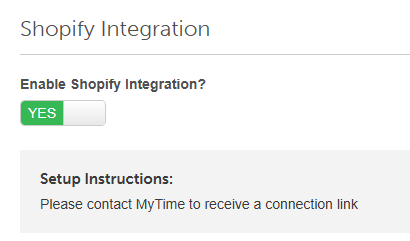
- Click Save
- Open the connection URL provided by MyTime Support. A Shopify page opens
- Click "Install App" in the top-right corner of the page. The MyTime settings page opens
- Map each Shopify location to its matching MyTime location and save
- Click Save at the bottom of the settings page
Your connection is now live.
Common Use Cases
| SCENARIO | RESULT |
Inventory Management: You have 50 haircare products in inventory. You sell 10 through Shopify and 5 through in-store sales. | Inventory automatically updates to 35 across both systems. Shopify displays real-time availability, preventing overselling. |
| BOPIS (Buy Online Pickup In Store): A customer orders a spa package online for in-store pickup. | The order appears in MyTime as a ticket. Staff prepare the items, and once the order is marked Ready for Pickup, the customer receives an email notification. Order fulfillment automatically adjusts inventory levelsG. |
| BORIS (Buy Online Return In Store): A customer purchases a product on Shopify and returns it in-store. | Staff process the return in MyTime, the refund is automatically sent to Shopify, and inventory is restocked without manual reconciliation. |
| Gift Card Purchase & Redemption: A customer buys a $100 gift card on Shopify, then redeems $30 at your location. | The gift card syncs to MyTime. When staff redeem $30 in-store, the remaining balance automatically updates to $70 in both MyTime and Shopify. |
Troubleshooting Connection Issues
Connection URL doesn't work: Ensure you are logged into your Shopify store with admin permissions before opening the link.
Products aren't syncing: Verify that the Sell Online toggle is enabled for the product in MyTime.
Location mapping fails: Double-check that the Shopify Location ID is entered correctly. You can find this ID in your Shopify admin under Settings > Locations.
Related Articles:
Was this article helpful?
That’s Great!
Thank you for your feedback
Sorry! We couldn't be helpful
Thank you for your feedback
Feedback sent
We appreciate your effort and will try to fix the article
