Email domain filtering allows you to control which email domains are permitted to create accounts and book appointments online. By specifying approved domains, you can limit online bookings to authorized users while still allowing other clients to book as guests, if desired. This article explains how the feature works and how to configure it.
Things to know:
- This feature is managed through a hidden setting that only the MyTime team can activate. To enable it, please contact our support team at support@mytime.com.
- Clients with email domains not included in your approved list can still book appointments as guests if the “Allow guest checkout?” option is enabled.
- To have greater control over online bookings, you can set the “How should online bookings be handled?” setting to keep bookings in a 'pending' state until you manually approve them.
Scenarios
Scenario 1: Unapproved Email Domains
If you approve only certain domains (e.g., gmail.com, yahoo.com) and a client attempts to create an account using an unapproved domain, they will receive an error and will be unable to create an online account or complete purchases online.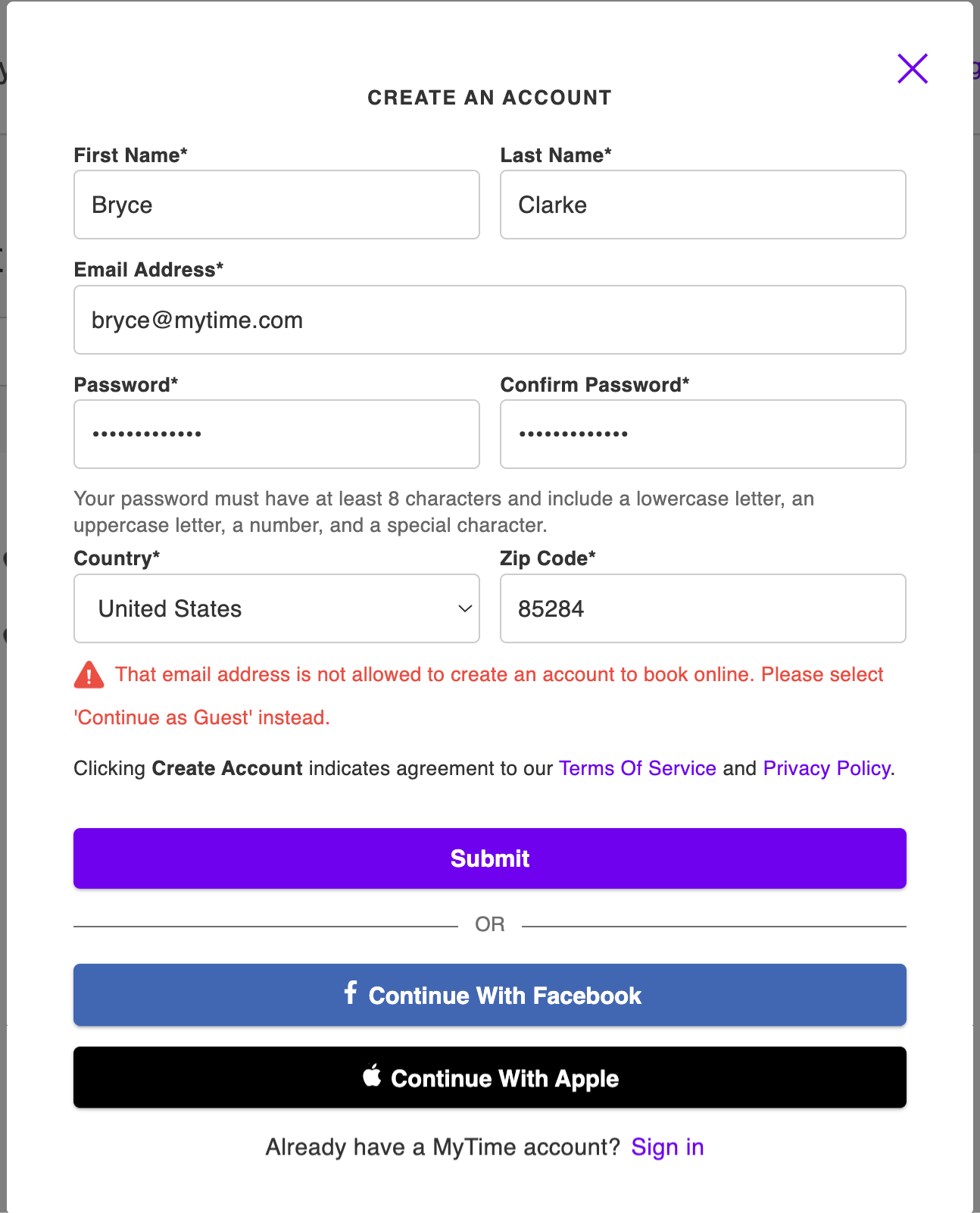
Scenario 2: Approved Email Domains
Clients using an approved email domain will be able to create accounts and book online without restriction.
For more information contact us at support@mytime.com.
Related Articles:
Was this article helpful?
That’s Great!
Thank you for your feedback
Sorry! We couldn't be helpful
Thank you for your feedback
Feedback sent
We appreciate your effort and will try to fix the article