ADP Wisely enables you to send tips electronically to your staff members, which they can access via a specialized debit card. This integration allows you to securely transfer tip data from MyTime to Wisely every 24 hours through an automated File Transfer Protocol (FTP).
Things to know:
- The ADP Wisely integration is available as an add-on subscription for $10 per location per month. To add ADP Wisely to your MyTime account, please contact support@mytime.com
- If the ADP Wisely integration is active, MyTime will not send tip data to ADP Workforce Now® Next Generation or RUN Powered by ADP® (even if those integrations are also active on your account). This built-in safeguard prevents tips from being double-reported or duplicated across your payroll.
- Your secure FTP connection credentials must be obtained directly from your ADP representative.
- Once enabled, the integration applies globally across the location. All digital tips tracked in MyTime must be processed through Wisely.
- Cash tips are not supported by this integration. Any tips recorded on a ticket must be routed through Wisely and cannot be withdrawn or marked as paid out in cash within MyTime. For example, if a client adds a cash tip, you will be required to provide the staff member with that tip
- By default, ADP Wisely tips automatically appear as "Taken" in your MyTime Tips Report. If you prefer to change this behavior, contact support to enable the hidden setting: "Don’t show ADP Wisely Tips as ‘Taken’ in the Tips report."
- The setup option displayed in the top-right user menu depends on how you access the account and your assigned role:
- When navigating from the Parent Account (Location Management tab):
- Admin: Displays Business Setup when viewing the location account.
- Login As: Displays Location Setup when viewing the location account.
- When logged in directly at the Location Level:
- Location Owners & Location Managers: Display Location Setup.
- Service Providers & All Other Roles: Display Profile Setup.
To add ADP Wisely Credentials on MyTime, follow the steps below:
Once you have received your secure FTP credentials from ADP, follow these steps to configure the integration in your MyTime account:
- Log into your MyTime dashboard
- Click the menu next to your name in the top right-hand corner and select Business Setup / Location Setup from the menu
- Navigate to the Settings page then select the Partners Integration tab
- Scroll down to the ADP Wisely Integration section and fill out the following configuration settings:
- Enable ADP Wisely Integration: Toggle this switch to ON to activate the integration logic.
- Send Test File?: Determine whether the initial files uploaded to ADP are treated as test runs or live production files.
- Daily Run Time: Controls the exact time the automated export job runs each day. Enter your desired time using 24-hour format (e.g., 19:00 for 7:00 PM). Note: The system schedules the export based on your company primary location's time zone.
- Utilize the current date for exporting?: This determines the date range of the tips compiled in your daily export file.
- Toggle ON (Current Day): Exports tips generated on the current calendar day up until your scheduled Daily Run Time. (The system sets the export date to Today).
- Toggle OFF (Previous Day - Default): Exports a full 24 hours of data from the previous completed calendar day. (The system sets the export date to Yesterday).
- This depends entirely on your Daily Run Time. If your export runs late at night and you want to capture the current day's business earnings, toggle this ON. If you prefer to export a clean, finalized batch of the previous day's earnings the following morning, leave it OFF.
- Complete the FTP credential fields exactly as provided by ADP:
Host
Account Number
File Name Prefix
Username
Password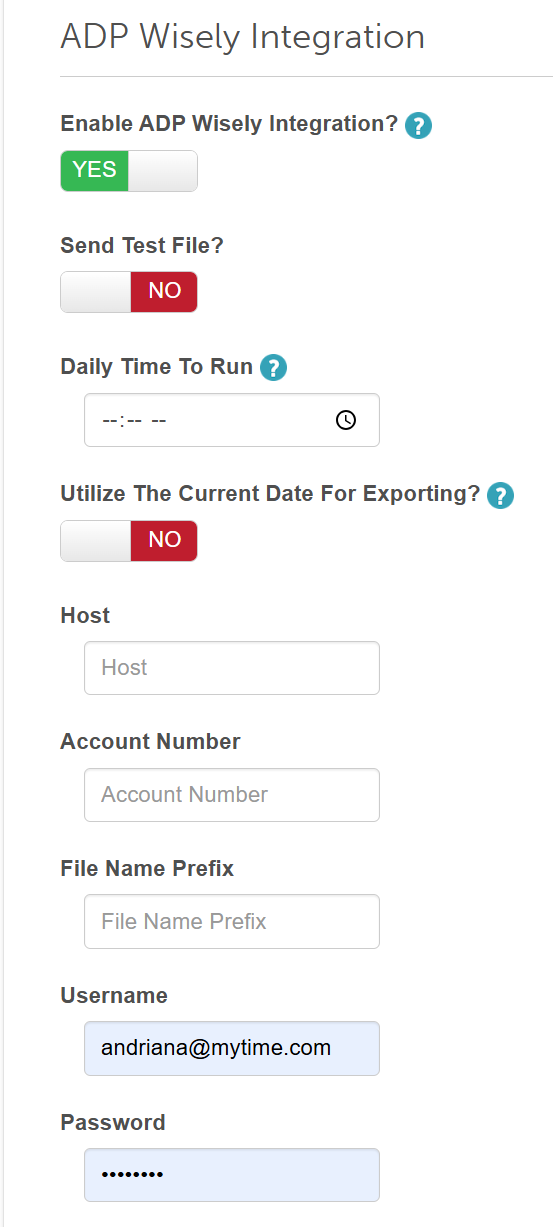
- Click 'Save' at the bottom of the page to apply your settings.


For additional information, please contact us at support@mytime.com.
Was this article helpful?
That’s Great!
Thank you for your feedback
Sorry! We couldn't be helpful
Thank you for your feedback
Feedback sent
We appreciate your effort and will try to fix the article